|
|
 |
FREE TRIAL
SecureSchool
Our all-in-one Internet filter is like a multitasking Swiss army knife,
featuring a transparent proxy server, an E-rate-eligible firewall and caching server,
and lots of options for customization
Tired of expensive, pain-in-the-neck
Internet filters?
Fed up with shoddy customer service? Then it’s time for a new web-filtering solution.
SecureSchool offers:
- A basic appliance with all the features you need—and none of the overkill extras you pay handsomely for and never use
- Amazing add-on features that let you customize your device to do exactly what you want
- An easier-to-use interface and better performance than big-ticket filters
- “The best tech support in the business,” as our customers like to say
Comparable to big-name Internet filters like
Barracuda,
SmoothWall, and
SonicWALL,
SecureSchool has all the brawn and flexibility you need—at a fraction of the cost and minus any licensing and maintenance fees.
Our unique and economical pricing model bases
your fee
on number of students—not bandwidth, not devices, and not number of users.
Plus, SecureSchool keeps you
CIPA compliant
and is 60%
E-rate
eligible* (base price before options), thanks to its bundled
caching server
(40% of cost) and
firewall
(20% of cost).
For busy, stressed-out, IT professionals, there’s simply no better content-filtering tool that saves time,
spares headaches, and meets all your needs—and your budget.
Powerful Customization Features
- Customize your options to prohibit sites like Facebook and YouTube
- Prevent hackers from bypassing filters
- Activate multiple filtering methods to keep users safe, secure, and on task, including:
- URL and domain filtering
- Content-phrase filtering
- MIME filtering
- File-extension filtering
- Inside and outside proxy blocking
- Time restrictions
Incredibly Versatile
SecureSchool integrates with other K12USA products, including
WirelessTrakker,
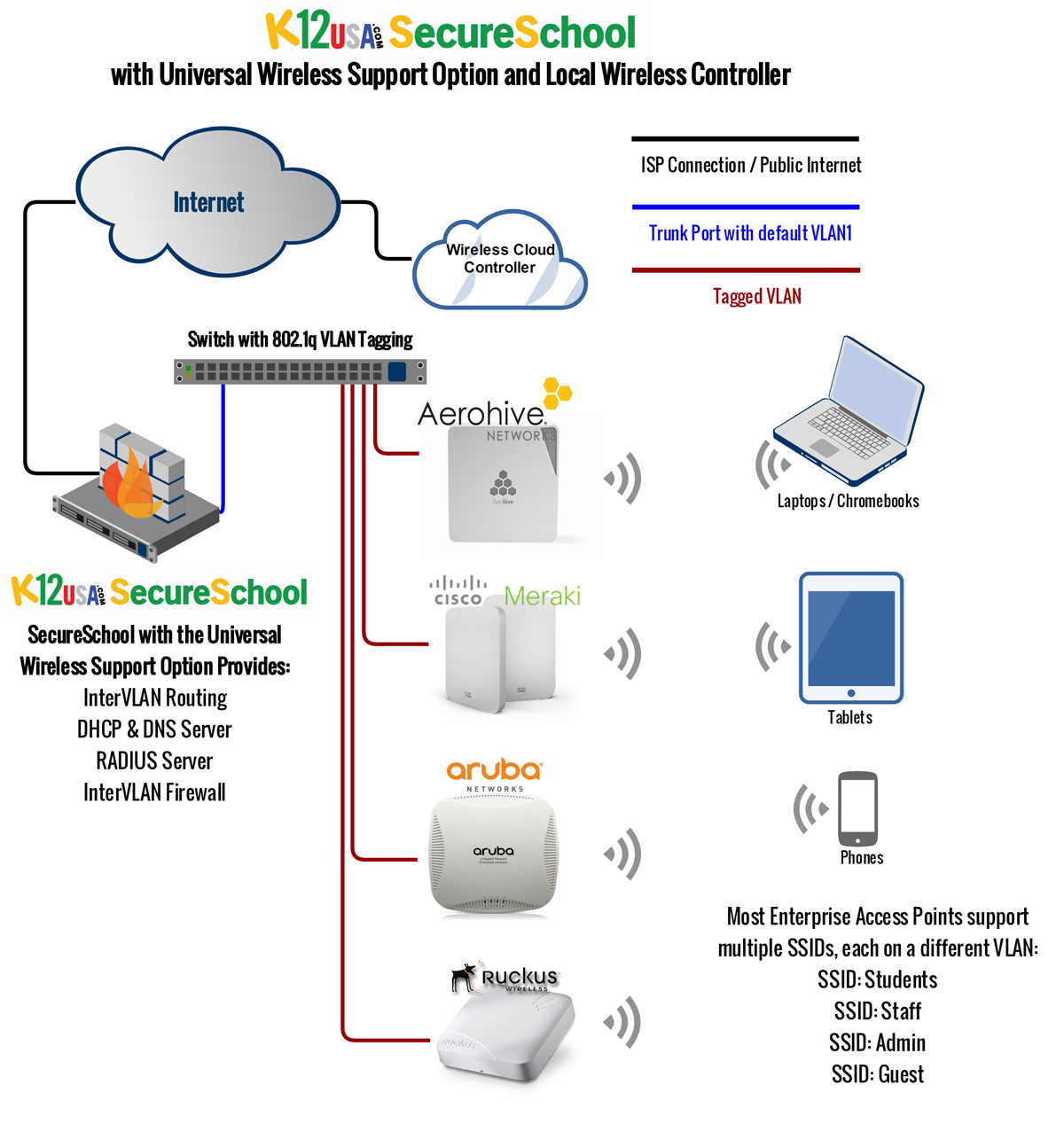
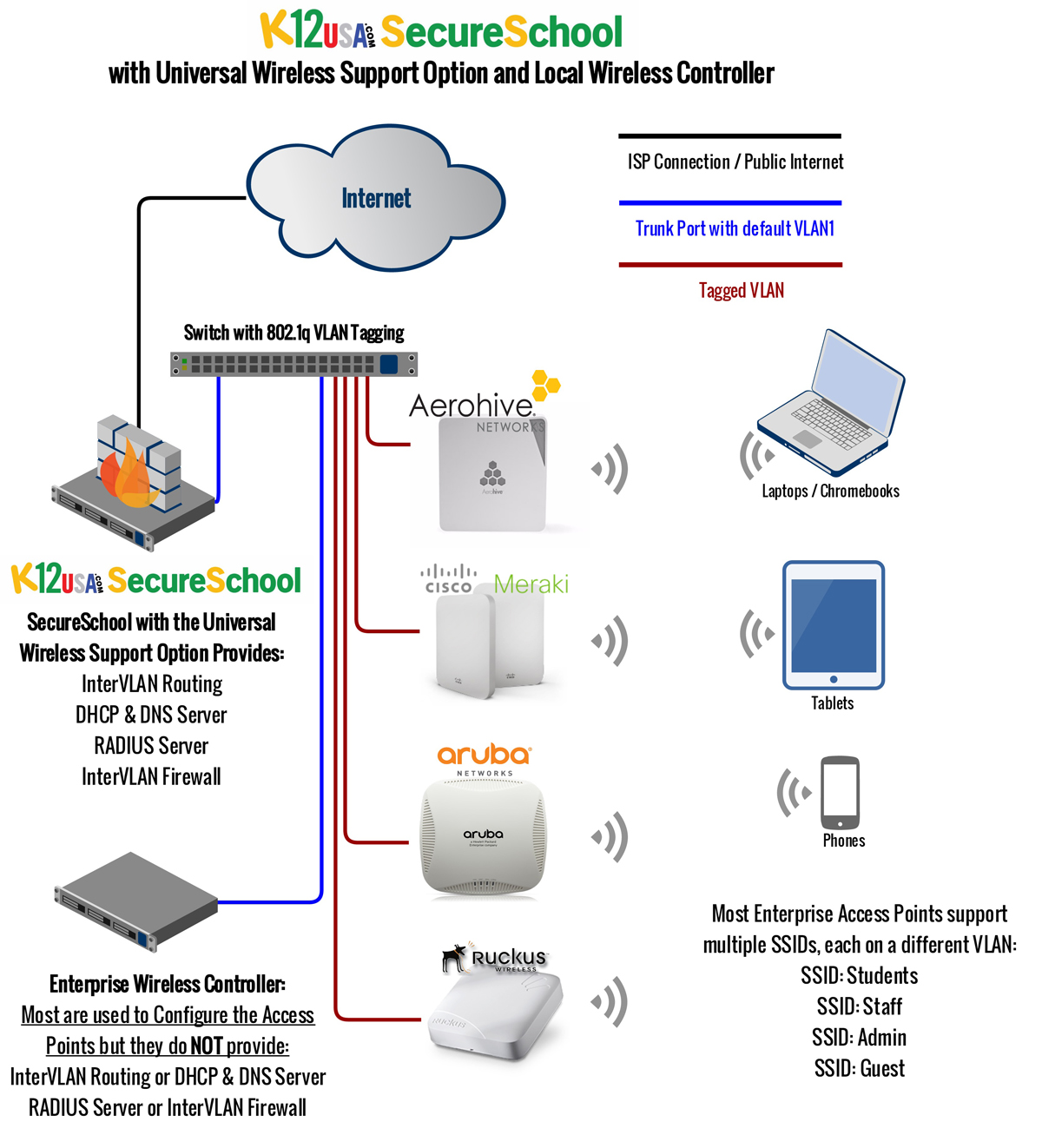
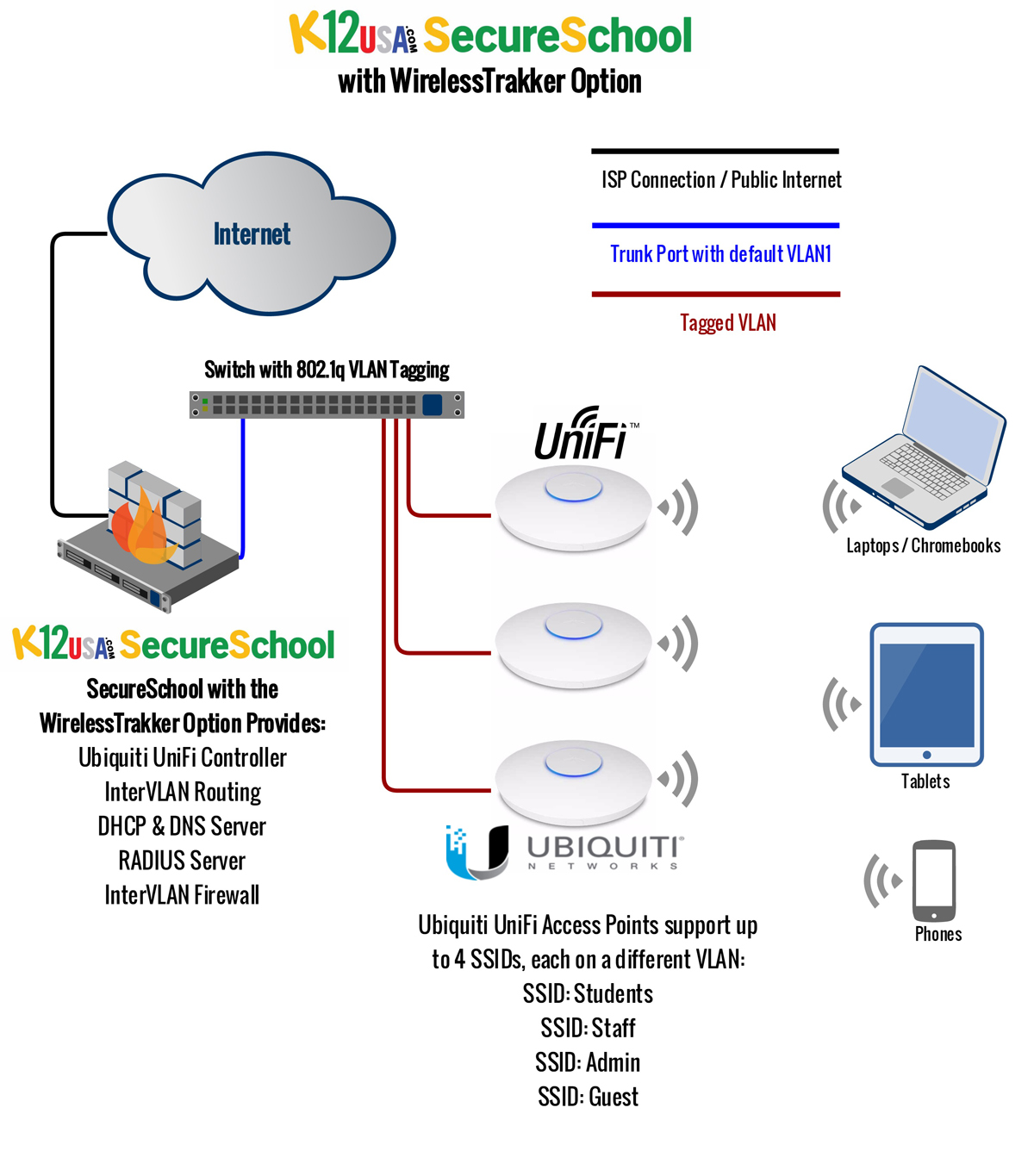
our wireless-network management service (check out the setup in these simple diagrams).
It can also be used in tandem with
SchoolBits
student email service, and
WebMailPRO
our email system for staff.
Options and Add-Ons
Handpick the
cost-effective features
you want to bolster your SecureSchool’s capabilities:
WirelessTrakker
Universal Wireless Support for Ubiquiti UniFi Access Points
Hosts the
controller
software for the wildly popular Ubiquiti UniFi APs—providing the missing elements needed for a complete
multi-SSID
solution. Includes
inter-VLAN routing,
DHCP
for each VLAN,
DNS
for VLANs, multicast DNS
(Bonjour),
RADIUS
enterprise authentication, VLAN
firewalls,
and more.
WirelessTrakker
Universal Wireless Support for Non-Ubiquiti Access Points
Supports a wide variety of wireless systems that are lacking the elements needed to be a complete
multi-SSID
solution. Our add-on includes the missing features like
DHCP
for each
VLAN,
DNS
for VLANs, inter-VLAN routing, multicast DNS
(Bonjour),
RADIUS
for enterprise authentication, and VLAN
firewalls.
Load Balancer
Eliminates sluggish performance caused by a maxed-out single connection and prevents network
interruptions brought on by power outages, capacity overload, and unreliable ISP connections.
Transparent Filtering and SSL Intercept
Our ingenious transparent filtering solution is perfect for today’s proxy-unfriendly
BYOD
gear—like iPads, iPhones, and Android phones and tablets. It works with all devices on your network you can’t
(or don’t want to) configure with proxy settings, including PCs, Chromebooks, and Macs. Includes an
SSL
intercept so you can content filter
HTTPS
traffic.
Home-to-School VPN
Give anyone you designate—such as teachers, students, and administrators—the ability to
connect to your school’s network remotely, offering them the flexibility to work offsite with
all your school’s resources at their fingertips.
School-to-School VPN
Economically and securely joins your school’s entire network with the network of one (or more)
partner school’s entire network(s), giving staff and students access to your combined resources.
SecureSchool Spare Appliance
What if your SecureSchool appliance gets damaged in an outage or other event? Can you afford the downtime needed
to replace or repair your device? With our preconfigured spare appliance already at your site, you don’t
need to put everything on hold until a replacement arrives.
Try SecureSchool For FREE
No money down, zero obligation. Two ways to check it out:
Test-Drive SecureSchool Remotely
Just log in and go! Contact us at 877-225-0100 or
support@k12usa.com,
and we’ll give you the username, password, and other meaty details.
Get a Free 30-day Trial in Your School
We’ll ship you the SecureSchool appliance (which you keep for the length of your subscription
if you decide to subscribe; ground shipping is free both ways in the continental U.S.).
Call 877-225-0100 to get started or fill out this
quick form.
In the market for an Internet filter? Use our
handy checklist
while you shop and compare.
Take a peek at SecureSchool with our
click-through screenshots.
The Nuts and Bolts
Your SecureSchool Subscription Includes All This
Hardware, Software, and Support
A
1U
rack-mountable Internet appliance server bundled with:
All installation accessories: rack-mount kit, two Category 6 cables and a Cat 6 crossover cable,
a USB-to-serial adapter, and a serial null modem cable
All the perks of K12USA:
- Free, unlimited tech support
- Free hardware replacement in case of damage, failure, or capacity overload
- Free hardware and service upgrades
- Free, automatic data backup and updates
- Free, two-way ground shipping in the continental U.S. (Alaska and Hawaii pay partial shipping)
Web-Based Controls
Web Filtering
- Website access — Block, allow (unfiltered), or filter sites by content
Categories include: advertising, aggressive, audio/video, chat, diversions, drugs, entertainment, gambling,
hacking, job search, mail, news, online auctions, online games, online payment, phishing, plagiarism, pornography,
proxy, social networking, sports, spyware, violence, virus infected, warez, and your own custom list
- Time restrictions — Curtail cyberslacking by setting time-of-day limits
- Create port-access rules — Allow port access: normal/HTTP or SSL/HTTPS
- Authentication
exceptions — Add to and edit your own list of websites that don’t work well with authentication
- Caching
exceptions — Maintain your own list of websites that shouldn’t be cached
- IP exceptions — Workstations that need to be unfiltered for a specific time period
- Top-level domain blocking — Used primarily for blocking foreign domains, like Russia’s .ru
- YouTube filtering
- Manage blacklist and whitelist
Content Filtering
Weighted Words and Phrases — Eliminates blocking pages unnecessarily by examining web-page
text for the number of times a questionable word or phrase occurs. If a “bad word” shows up
once, it may not be a problem.
For example, “proxy” appears five times and “sex” three—those numbers are
added up for a total weight. You can assign positive and negative weight values in the Rules:
- Phrases associated with good subjects have negative values
- Phrases associated with bad subjects have positive values
- Values are added together for a total weight
- If the total weight exceeds the weight threshold set, the page is blocked
Four Types of Word Matching – Example using the word can:
- Exact match – Must exactly match the word can
- Contains – Matches words containing can, e.g., can,
candy, scandal, or pecan
- Begins with – Matches can, candy, or cancel
- Ends with – Matches can, pecan, or toucan
False Blocking – You can eliminate false blocking by setting rules
for words that have more than one context
- For example: Assign a web page one weight value if it contains just the word “breast”
and a different weight value if the page contains “chicken breast”
Content-filtering categories include:
bad foreign-language words, chat words, drug-advocacy words, gambling words, game words, gore words,
illegal drugs, intolerance words, legal-drugs words, peer-to-peer file sharing, personal words, pornography words,
positive words, proxy words, violence words, warez and hacking words, weapons words, webmail words, and your own custom list.
Note: All words in these categories can be viewed and/or edited by SecureSchool administrators.
Weight Threshold — When web pages are searched, weight values are added together
for a given page—and that page is given a total weight. If it exceeds the weight threshold (which can be viewed
and edited by SecureSchool administrators), the page is blocked.
File-Extension Blocking — Block by file extension from our list of 60+ file extensions.
For instance, you can block all JPG files (of course, there would leave little to see on the Internet!).
More usefully, you could block executable file extensions to prevent students from downloading viruses and
restrict to tech staff, faculty, and whitelisted sites.
URL Filtering — Block websites by words contained in the URL, including prefixes and suffixes.
Categories include: advertising words, pornography words, pornography search words,
proxy words, search-control words, and your own custom list.
Note: All words in these categories can be viewed and/or edited by SecureSchool administrators.
MIME Filtering
Detects and blocks
MIME
file types. Many email clients support MIME, enabling users to send and receive graphics, audio, and video files via the Internet.
Web browsers also support various MIME types, which allow the browser to display output files that aren’t in HTML format.
You can block our list of 120+ MIME types with just one click.
Task Center
Here you’ll find easy-to-use global settings you can apply to everyone.
Most of these filter settings can also be managed by group-level filtering.
- Search Control Center
- Set global filters that force users to use the safe-search options offered by top search engines,
like Google, Bing, Dogpile, Excite, Google, Hotbot, WebCrawler, Yahoo, and YouTube
- Anti-Proxy Center
- Prevent users from using external bypass proxies
- This option turns on the appropriate filters under URL Filtering, Website Access,
Block IP Addresses, Weighted Words and Phrases, Firewall Rules, and Port Access
- Each of the options can be turned on or off
- Anti-Social-Networking Center
- Prevent users from creating and editing unapproved personal websites
- Anti-File-Sharing Center
- Set global filters to block peer-to-peer file-sharing programs.
- Email Control Center
- Control which email accounts users can and cannot access.
- Anti-Streaming Media Center
- Control streaming media, such as Internet radio, video, and webcasts.
- Chat Control Center
- Block the most common Internet chat programs
Reports, Graphs, and Logs
As one
customer
says, you get “reports, reports, reports!” Here they are:
REPORTS
- Usage summary reports
- URL access reports:
- View activity by URL
- Sort by URL, hits, or kilobytes of traffic
- Search options included
- View by month/year
- Filter reports — detailed information about content filtered by SecureSchool
- Emailed reports — show who’s using the most traffic,
who’s going to the most-blocked sites, most popular destinations, and more
GRAPHS
- Extensive set of graphs, including:
- Network graphs — check your five-minute average over a period of time
- Latency and loss
- Daily usage charts — sites, MB, visits, pages, files, and hits
- Hourly usage charts — pages, files, and hits
- Internet-traffic summary — hourly, daily, monthly, and yearly
- Summary by month — daily average hits, files, pages, and visits
- Monthly totals — sites, MB, visits, pages, files, and hits
LOGS
- Workstation-activity logs — lists all IP addresses that have sent traffic
through SecureSchool for a given time period (by the day, hour, or week)
- URL access — shows all the URLs that have passed through SecureSchool
- User access — reveals all users that have passed through SecureSchool (total visits, hits, files, and kilobytes of traffic)
- Log files
- Popular logs include: filter log, access-denied log, authorization-failed log, and activity log
- Logs can be exported as tab-delimited text files
- Logs are searchable by:
- User or workstation IP address
- Entire day or by specified time
- Exclude images
- Exclude JavaScript
- Exclude external style sheets
- Search for “all blocked” log messages
- Sites blocked because only those in the allowed-sites list are permitted
- A banned phrase was found in the URL
- A banned file extension was being accessed
- A filed with a banned MIME type was being accessed
- This is a “banned website”
- The weighted words and phrases limit was exceeded
- Site stats that were accessed without being filtered, because they’re on the allowed list
- Sites that were accessed without being filtered, because the user was an exception user
- Sites that were accessed without being filtered, because the workstation IP address was an exception IP
- Sites that were allowed because they didn’t trigger any filters
User Authentication, Group Filtering, and Moderation Options
SecureSchool can allow Internet access by users, groups of users, and/or workstations.
- Proxy authentication — authenticate by user
- IP groups — authenticate by workstation IP address
- NTLM
authentication — all Windows servers, including 2003, 2008, and 2012
- LDAP
authentication — for Apple and Novell NetWare
- Kerberos
authentication — with Windows all Windows servers, including 2003, 2008, and 2012
- Filter group and moderator accounts — create multiple filter groups and moderator accounts
- Unblock requests — turn on notification preferences to allow unblock requests to be sent via email to specified moderator(s)
- Block message(s) — customizable block message; SecureSchool administrators can include school logo,
a link to the school’s Internet Acceptable User Policy (AUP), and custom messages
Firewall
- Protocol rules — can be edited
- Port forwarding — forwards specific types of traffic from the outside, through the proxy, to the server that handles requests
- Address forwarding — redirects all traffic from an external IP address to an internal IP address (not recommended)
- DMZ
rules — protect your internal network from the public Internet
Tools and Tests
- Diagnostic tools —
ping,
traceroute,
Mtraceroute, traffic sample,
WHOIS,
DNS,
DNSTrace,
CIDR
calculator
- Firewall — stats, full log, accept log, deny log, count log
- Status — interface setup, interface stats, routes, date/time,
ARP (Address Resolution Protocol) table, flush ARP, inside traffic, outside traffic
- Windows domain — group membership, group list, status
The Amazing Perks of K12USA
Hardware-replacement program — If your equipment gets damaged or fails,
we’ll ship a free replacement ASAP (and even cover ground-shipping costs in the continental U.S.).
Free equipment upgrades — Are your traffic needs outgrowing your SecureSchool box?
If so, we’ll ship you a bigger appliance—it’s free with your subscription.
Free, automatic software upgrades — When a newer version of
SecureSchool is available, we’ll automatically update your box.
Nightly data backups and updates — Every SecureSchool box “phones home”
to our office each night, so we can backup all your customizations and settings.
If you have to replace the box for any reason, the new one will arrive with all your settings intact.
Free, unlimited tech support. We’re super smart and really nice, and we don’t care
how many times you call or write. Talk to a live person now at 877-225-0100 or shoot us an
email—we’ll resolve your problem quickly.
You can also get in touch via the contact form on your SecureSchool interface.
Discounts for multi-year, multi-service customers —
You may qualify for discounts on top of your already-low costs; contact us for details.
What if your SecureSchool gets damaged in a power or other event? Keep a
spare appliance
on hand—it’s the best service contract on the planet for a
teeny investment.
Ready to run with the powerful, economical SecureSchool Internet filter? We’ll get you started in no time.
Just shoot us a message now or call 877-225-0100.
Note: We believe our statements about E-rate eligibility are accurate based on our
reading of the new FCC guidelines. Actual eligibility is not guaranteed and will be determined by USAC and/or FCC after applications are submitted.
| LibraryLine.com ©1999-2024 |
Networks & More! Inc. |
|
|